![nomono-logo-default-on-light (1) (1)-2.svg]](https://support.nomono.co/hubfs/nomono-logo-default-on-light%20(1)%20(1)-2.svg)
Caution! If the app is closed while a recording is in progress, audio data is no longer transferred to the Studio App in real time. Instead, the audio continues to record and is stored temporarily in the internal buffer memory of the Stellar Mics.
How to prevent this from happening
There are two ways to reduce the risk of Android closing the app during recording:
Option 1: Keep the app open during recording
Leave the Studio App visible on the screen while recording. This may use slightly more battery on your phone or tablet, but it ensures:
-
The app remains active
-
You can monitor recording progress in real time
-
Audio data is transferred continuously
Option 2: Adjust battery optimization settings
If you prefer to leave the app running in the background, we recommend changing the battery optimization settings for the Studio App.
How to change battery optimization settings on Android
-
Open the Android Settings app
-
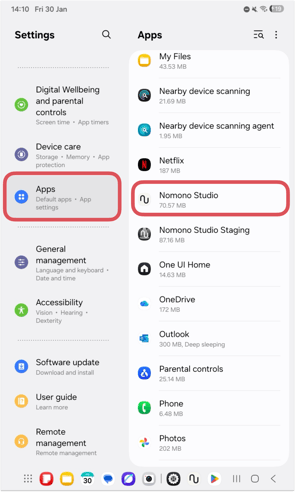
Go to Apps and select Nomono Studio
-
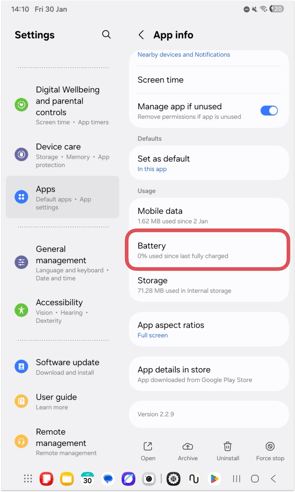
Enter the Studio App Battery settings
-
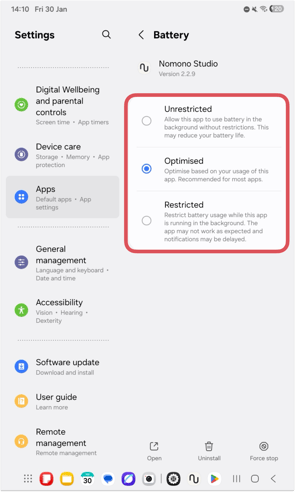
Choose one of the following options:
-
Unrestricted (recommended)
-
Optimized
-
Restricted
-
To minimize the chance of Android closing the app while it is running in the background, make sure Unrestricted is selected.