![nomono-logo-default-on-light (1) (1)-2.svg]](https://support.nomono.co/hubfs/nomono-logo-default-on-light%20(1)%20(1)-2.svg)
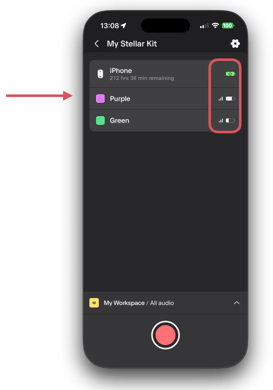
Signal strength indicators show:
-
The connection quality between your recording device (phone or tablet) and each Stellar Mic
-
Whether a microphone is within range and connected
Battery level indicators show:
-
The remaining battery level for each Stellar Mic
-
The remaining battery level for your recording device (phone or tablet)
When these indicators are visible
As long as the Stellar Mics are powered on (not sleeping) and within range of your recording device, the battery and signal strength indicators will give an accurate picture of your system’s status before, during, and after recording.
These indicators are intended to help you quickly confirm that everything is ready and performing as expected.
A note about connection status
If a microphone appears disconnected, the app cannot always tell whether the mic is:
-
Out of range, or
-
Powered off
In both cases, the result looks the same in the app: the signal is lost. If this happens, we recommend checking that the microphone is powered on and brought back within range of your recording device.
Why this matters
Checking signal strength and battery levels before starting a recording can help prevent issues such as:
-
A microphone losing connection
-
A battery running out mid-recording
Taking a moment to confirm that everything looks good beforehand can greatly reduce the risk of interruptions or lost audio.