---
title: Why Is My Stellar Mic Losing Connection and How Can I Fix It?
description: If you're experiencing problems while recording with your Nomono Sound Capsule, it may be due to either being out of range or interference in your recording environment. Fortunately, there are solutions to ensure a smooth recording experience.
---
[Skip to content](https://support.nomono.co/stellar-mic-connection#main-content)
[Contact us](https://support.nomono.co/kb-tickets/new?hsLang=en)
[![nomono-logo-default-on-light (1) (1)-2.svg\]](https://support.nomono.co/hubfs/nomono-logo-default-on-light%20(1)%20(1)-2.svg)](https://nomono.co)
Open main navigation
Close main navigation
- [Contact us](https://support.nomono.co/kb-tickets/new)
- [Go to nomono.co](https://nomono.co/)
[Go to nomono.co](https://nomono.co/)
How can we help you?
- There are no suggestions because the search field is empty.
1. [Knowledge Base](https://support.nomono.co/?hsLang=en)
2. [Sound Capsule](https://support.nomono.co/sound-capsule?hsLang=en)
3. [Troubleshooting](https://support.nomono.co/sound-capsule?hsLang=en#troubleshooting)
# Why Is My Stellar Mic Losing Connection and How Can I Fix It?
## If you're experiencing problems while recording with your Nomono Sound Capsule, it may be due to either being out of range or interference in your recording environment. Fortunately, there are solutions to ensure a smooth recording experience.
### Stay Within Range
The Stellar Mics function best within a **5-meter radius** of the Space Recorder. In most typical recording scenarios, you will likely be closer than 5 meters, which is beneficial not only for maintaining a stable connection but also for optimizing audio quality through localization and ambience reduction algorithms in the Nomono AI enhancement processor. Additionally, since interaction and monitoring of the Space Recorder are recommended during recording, staying relatively close allows for more effective oversight of the recording process. You can read more about the Stellar Mic range [here](https://support.nomono.co/how-far-can-the-microphones-be-away-from-each-other-but-still-record?hsLang=en).
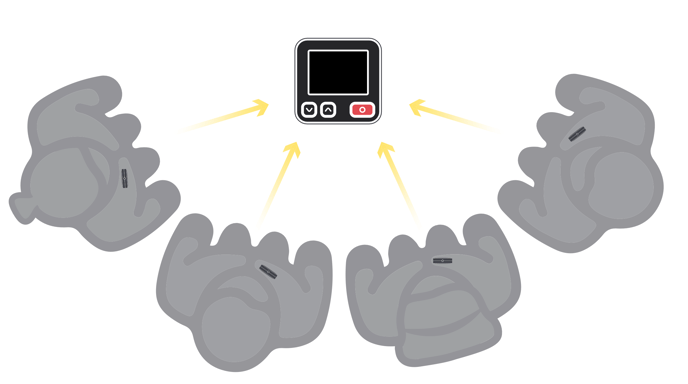
**Tip:** Read more about the way the Sound Capsule handles your audio [here](https://support.nomono.co/how-does-the-sound-capsule-handle-my-audio-files?hsLang=en).
### Monitor the Space Recorder Display
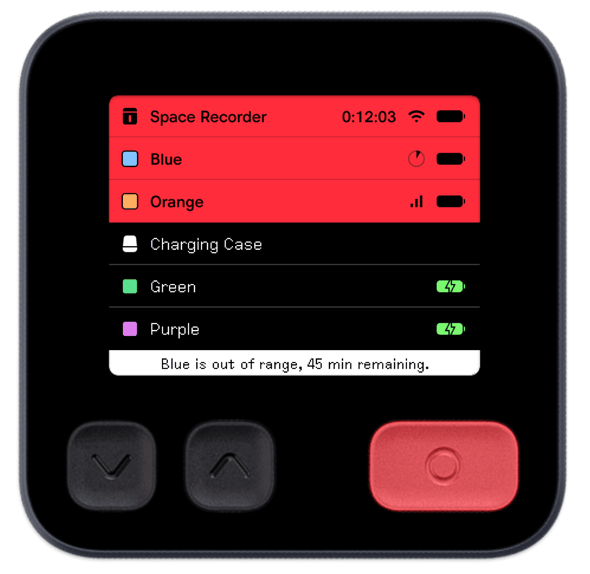
During your recording, regularly check the Space Recorder’s display. If a microphone’s signal strength indicator is replaced by a **pie chart**, this means the internal buffer storage is being used. The buffer can store up to **45 minutes** of audio before data loss occurs, so it’s important to act before the storage fills up completely. See the image below:
### Identifying and Addressing Interference
If you experience connection issues while well within range, the cause may be **wireless interference**. Unfortunately, interference is something neither you nor Nomono can directly control. However, here’s what you can do:
- **Pause and Transfer Data**: To prevent buffer overflow, pause recordings **around the 1-hour mark** and transfer stored data. This frees up buffer memory, allowing you to continue recording seamlessly.
- **Relocate**: If interference continues to be an issue, consider moving to a different recording location with fewer wireless signals.
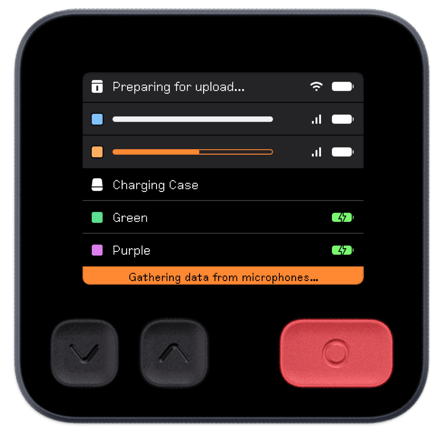
**Note:** Gathering data from the Stellar Mics whilst in an environment with significant interference may take slightly longer than normal, and may affect each Stellar Mic differently. This is because each Stellar Mic uses a different radio antenna and they may therefore be subjected to different levels of interference.
### Common Causes of Interference
Interference is typically caused by other wireless signals in the **2.4GHz range**, such as:
- Wi-Fi networks
- Bluetooth devices
- Other wireless equipment operating in the same frequency band
By staying within range, keeping an eye on your display, and managing buffer storage effectively, you can avoid interruptions and ensure high-quality recordings with your Nomono Sound Capsule.
- [Getting Started](https://support.nomono.co/getting-started?hsLang=en#main-content)
- [Introduction](https://support.nomono.co/getting-started?hsLang=en#introduction)
- [Get to know your Sound Capsule](https://support.nomono.co/getting-started?hsLang=en#get-to-know-your-sound-capsule)
- [First Time Use](https://support.nomono.co/getting-started?hsLang=en#first-time-use)
- [User Manual](https://support.nomono.co/getting-started?hsLang=en#user-manual)
- [Tutorials](https://support.nomono.co/getting-started?hsLang=en#tutorials)
- [Sound Capsule](https://support.nomono.co/sound-capsule?hsLang=en#main-content)
- [Charging and Battery](https://support.nomono.co/sound-capsule?hsLang=en#charging-and-battery)
- [Sound Capsule FAQ](https://support.nomono.co/sound-capsule?hsLang=en#sound-capsule-faq)
- [Stellar Mics FAQ](https://support.nomono.co/sound-capsule?hsLang=en#stellar-mics-faq)
- [Travelling with the Sound Capsule](https://support.nomono.co/sound-capsule?hsLang=en#travelling-with-the-sound-capsule)
- [Troubleshooting](https://support.nomono.co/sound-capsule?hsLang=en#troubleshooting)
- [USB File Transfer](https://support.nomono.co/sound-capsule?hsLang=en#usb-file-transfer)
- [Video and live streaming](https://support.nomono.co/sound-capsule?hsLang=en#video-and-live-streaming)
- [Wi-Fi and Connectivity](https://support.nomono.co/sound-capsule?hsLang=en#wi-fi-and-connectivity)
- [Stellar Kit](https://support.nomono.co/stellar-kit?hsLang=en#main-content)
- [FAQ](https://support.nomono.co/stellar-kit?hsLang=en#faq)
- [Troubleshooting](https://support.nomono.co/stellar-kit?hsLang=en#troubleshooting)
- [Studio Cloud](https://support.nomono.co/studio-cloud?hsLang=en#main-content)
- [Account](https://support.nomono.co/studio-cloud?hsLang=en#account)
- [AI Enhancement](https://support.nomono.co/studio-cloud?hsLang=en#ai-enhancement)
- [Cloud FAQ](https://support.nomono.co/studio-cloud?hsLang=en#cloud-faq)
- [Collaborating and Sharing](https://support.nomono.co/studio-cloud?hsLang=en#collaborating-and-sharing)
- [Commenting](https://support.nomono.co/studio-cloud?hsLang=en#commenting)
- [Editing](https://support.nomono.co/studio-cloud?hsLang=en#editing)
- [Subscription](https://support.nomono.co/studio-cloud?hsLang=en#subscription)
- [Troubleshooting](https://support.nomono.co/studio-cloud?hsLang=en#troubleshooting)
- [Uploads and Downloads](https://support.nomono.co/studio-cloud?hsLang=en#uploads-and-downloads)
- [Orders, shipping and returns](https://support.nomono.co/orders-shipping-and-returns?hsLang=en#main-content)
- [Orders](https://support.nomono.co/orders-shipping-and-returns?hsLang=en#orders)
- [Payment and billing](https://support.nomono.co/orders-shipping-and-returns?hsLang=en#payment-and-billing)
- [Returns](https://support.nomono.co/orders-shipping-and-returns?hsLang=en#returns)
- [Shipping](https://support.nomono.co/orders-shipping-and-returns?hsLang=en#shipping)
- [Warranty](https://support.nomono.co/orders-shipping-and-returns?hsLang=en#warranty)
- [Updates and New Features](https://support.nomono.co/updates-and-new-features?hsLang=en#main-content)
- [Sound Capsule](https://support.nomono.co/updates-and-new-features?hsLang=en#sound-capsule)
- [Nomono Cloud](https://support.nomono.co/updates-and-new-features?hsLang=en#nomono-cloud)
- [Guides](https://support.nomono.co/updates-and-new-features?hsLang=en#guides)
[-2.png?width=160&height=24&name=logo%20(1)-2.png "Chill listening crop-3")](http://nomono.co)
Knowledge Base
Copyright © 2026, Nomono